MCP as a Functional Personal Knowledge OS
Building a $1/Month Agentic Knowledge Assistant
I spent years logging everything to Tana, a cloud-based Personal Knowledge Management (PKM) system. When I say “everything,” I really do mean everything. Tasks. Projects. Contacts. Random late-night musings. Notes to self. Song ideas. Gift ideas. Grocery lists. Recipes. Interesting articles. I put EVERYTHING in there.
In 2025, I became uncomfortable with this. Tana is cloud-hosted and uses a completely proprietary, highly complicated data scheme. It lets you export your data, but the output is essentially incomprehensible. There was really no way for me to get my data out.
Furthermore, with increasingly powerful AI systems and an ecosystem of adjacent tools expanding at an exponential rate, I was locked into not only Tana’s proprietary database but also its built-in AI features.
So I used Claude Code to break my data out of the PKM jail.
In a single session, I created a Python script that parsed Tana’s fiddly export schema into pristine, properly-typed markdown files with YAML frontmatter. A second session turned the script into a cross-platform desktop app. A third gave it a multi-step wizard that lets any user configure exactly what to extract, how to convert it, and which metadata to retain. I called it tanamigrator and put it on GitHub. It got forked a few times and picked up some traction on Reddit. I guess I wasn’t the only one looking to jailbreak their notes.
But the migration tool wasn’t the interesting part. The interesting part was what I was able to do once I’d unlocked my data.
Why I Built My Own Assistant
I decided to use Obsidian as my new markdown notes app. It’s a great tool, and one I’d used in the past. But it’s basically a glorified text files editor. It has no AI capabilities at all, and I have grown accustomed to using AI to work with my data. That left deciding how I would integrate AI into the picture.
Spinning up Claude Code in the root of my vault seemed obvious and was immediately powerful. It could restructure files, fix missing metadata, and surface patterns I couldn’t see.
But Claude Code is massive overkill. And it’s expensive. My $20/month Pro subscription was already strained. Using Claude Code as a daily knowledge assistant would likely mean upgrading to a $100/month Max plan. Hell no. There are subscription AI knowledge services out there, including several specifically designed for markdown vaults. You fork over $15/month plus all of your most intensely personal information to an unknown third party. No. I wanted to own the system and own my data. And I wanted this to be cheap.
So I decided to use Claude Code for what it’s actually best at: building things.
What I Built
I used Claude Code to build an agentic knowledge management system: obsidian-tools. It’s open source. Here’s the architecture:
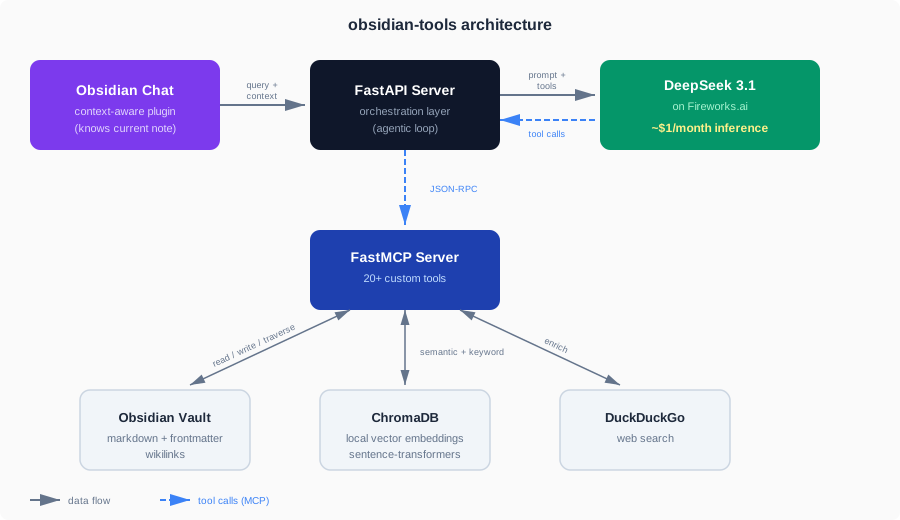
Here’s what the pieces do:
A local MCP server with custom tools. This is the core of the project. MCP (Model Context Protocol) is a JSON-RPC-based standard that lets an LLM interact with external systems through well-defined tool interfaces. It’s a menu of capabilities you give to an LLM. I built an MCP server using FastMCP that gives the LLM structured access to my vault:
- Vault navigation: file search, directory listing, wikilink traversal between connected notes, metadata-based sorting and filtering.
- Data manipulation: update, add, and remove YAML frontmatter properties; rearrange note sections; navigate note structure via headers; create and update notes.
- Audio transcription: detect linked audio files and transcribe them.
- Web search: call DuckDuckGo to enrich notes with live information.
- Session memory: the agent maintains a daily interaction log and a persistent
Preferences.mdfile. When I told it “when summarizing meeting recordings, just append the summary, don’t give me the full transcript unless I ask,” that preference was logged immediately and has been respected ever since.
Hybrid semantic + keyword search with Reciprocal Rank Fusion. ChromaDB handles local vector embeddings via sentence-transformers. A background service re-indexes hourly. At query time, the search tool runs both a semantic search and a keyword match, then merges the results with Reciprocal Rank Fusion so you get hits that are both contextually and terminologically relevant. The result is search that actually works across a large, messy vault.
A context-aware Obsidian chat plugin. Visually, it looks and works like every other chat UI you’ve ever seen. It’s simple. It has one important feature: it knows which note I have open and passes that context to the agent. This means I can say “update the metadata in this note” instead of “update the metadata in the ‘grocery list 2026-02-02’ note in the ‘random stuff’ folder.”
A FastAPI orchestration server. This is the bridge between the chat interface and the LLM. It receives a query from the Obsidian plugin (along with the current note context), forwards it to DeepSeek on Fireworks.ai with the MCP tool definitions, executes any tool calls the model requests, feeds results back, and returns the final response. It handles the full agentic loop, including multi-step tool chains where the model’s first tool call informs its second.
How It Performs (and Why it’s Cheap)
I knew I had a working solution when I asked my agent to “summarize the meeting recording in this note, extract action items, create a task for each one” and it nailed the ask. It chained several tools: audio transcription, content parsing, created individual task notes that matched my existing format by referencing other tasks in the vault, tagged them to the right project, and linked them back to the meeting note.
Model selection was a critical step. After testing several options on Fireworks.ai, I went with DeepSeek 3.1. Counterintuitively, more advanced reasoning models performed worse. They spiraled into self-doubt on simple queries, agonizing over tool selection and requesting confirmation for trivial operations. DeepSeek 3.1 is direct: it reads the query, selects the tools, executes, and responds.
Reasoning is expensive. Directness is cheap. In my first month, which included several massive testing days with 900K+ token sessions, I burned through $2.44 of Fireworks’ $6 signup credit. In steady-state daily use (about 150K-200K tokens), the cost works out to roughly $1/month.
The overall system does everything Notion AI does, except it runs locally, at a tiny fraction of the cost.
The Takeaway
You can check out obsidian-tools on GitHub. It’s open source. Do whatever you want with it.
But if you want an AI knowledge system, I’d encourage you to build one yourself. You know your requirements better than I do, and the stack is not complicated: an MCP server, a vector store, an API layer, and a cheap model on a hosted inference service. Claude Code built mine in a weekend. It understands English. Tell it what you need.
One More Thing (about Tana)
Tana is an ingenious PKM tool and I don’t mean or want to trash it. If you’re comfortable with cloud-hosted notes and built-in AI — and they just launched a local MCP server — it’s genuinely the best system of its kind. One day I realized I’d rather build exactly what I need than subscribe to what someone else thinks I need.